Automatronix
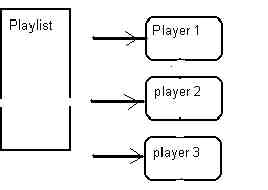
utilizes three distinct and separate players for manual and automatic operation.
Depending upon the mode of operation (MANUAL or AUTOMATIC), the players
react differently with the corresponding playlist of eventlist.
PLAY
MODE
During
MANUAL mode of operation, files in the playlist are loaded by selection
process. Once the files are loaded, any/all of the players can be started,
stopped, paused, advanced, etc. During file play, double-clicking on a
file in the playlist will load the next player not in play. Double-clicking
on a different file will remove the last selected file, and load the newly
selected file into that player. Selecting a different non playing player
can be obtained by clicking on the player song title window (which highlights
a white bar above the window), then double-clicking on the desired file
from the playlist. Once again, double-clicking on a different file loads
the corresponding file to the player. As files play, the background color
of the PLAYER FILENAME WINDOW of the corresponding player changes to blue.
Within 15 seconds of the end of the file, the player flashes between blue
and orange (events flash green and orange), until the overlap (end) time
is reached, in which it remains orange (until the next song is loaded).
When the player stops, the background color changes to gray.
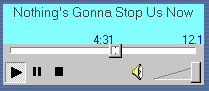
PLAYER DISPLAY WINDOW- Each player displays the following information, once a file is loaded either manually or automatically:
Title- shows the name of the file (without the trailing times or file extension)
Intro time (if tagged)- Shows the tagged intro time, located to the lower left side of the window.
Play time- Shows the total playtime of the file.
Overlap time - Shows the overlap time, located on the lower right side of the window. If there is no tagged time, it will display the default overlap time.
In
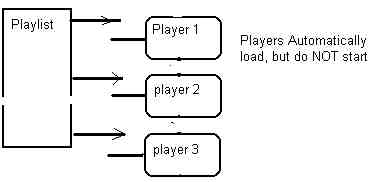
Auto mode, players 'cycle' in consecutive order, and sequentially load
items from the playlist.
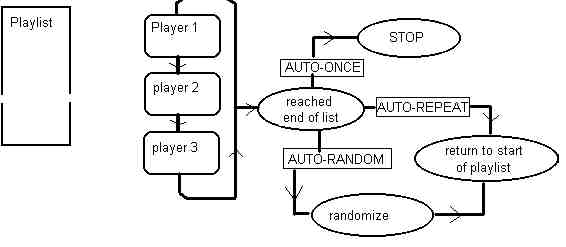
What
occurs when the end of the playlist is reached is dependent upon the SYSTEM
MODE.
AUTO-ONCE:
In
this mode, the files in the playlist cycle through the players until the
last file is reached.
At
this point, the players stop. Background colors are similar in nature to
the MANUAL mode.
AUTO-REPEAT:
This
mode is similar to AUTO-ONCE, with the exception of restarting the players
back
to
the beginning of the playlist, and starting again. This process goes on
indefinitely (or
operator
intervention).
AUTO-RANDOM:
This
mode is same as AUTO-REPEAT, however it randomizes the list just prior
to
repeating
back to the beginning of the playlist.
In
this mode, the system operates as follows:
1-
no songs in playlist,
2-
Events may be started manually OR automatically,
3-
Events may be 'stacked' in the eventlist.
4-
Inactivity timer is disabled.
5-
Events can be manually OR automatically loaded into the event box &
players.
modified 10/15/06